If you’ve ever had ten Bader tabs open just to answer “who’s ready for Blue ATP / who needs WHT / who’s not been on parade”… this is the antidote.
What it is
A full-screen dashboard for RAFAC staff that sits on top of the Volunteer Portal (and SharePoint where you use it). One login you already have — no new passwords, no data leaving Bader/SharePoint land.
Stuff it can do
Training & progression
Cadet Overall — colour-coded progress across First Aid, Shooting, Fieldcraft, DofE, Space, Leadership, Radio, Cyber, Road Marching, MOI, and more
See who’s at each level and who’s next-eligible for the next award
PTS Stats — progression by rank/classification with summary cards + sticky deep-dive table
Quals browser for cadets and staff (summary + deep dive)
Mandatory training — First Aid, climatic injury, portal/security/code-of-conduct style compliance
SME deep dives
Shooting — WHT, weapon categories, marksmanship badges, filter for event dates, cadet/CFAV, export for notifications
Fieldcraft — same flavour of readiness view for fieldcraft progression
Flying — wings/ATP status, hours & sorties, selection ranking for opportunities, “flown but no wings”, missing flying records vs Bader events
Map — interactive org/geography view (prob need expanding with more stuff)
Data quality
Data Problems — flags cadets who hold a Current award but fail the eligibility rules (great before you plan a course) ie how can a cadets get silver Space without having Blue qual?!
Jump summary by category so you can see “Shooting (3)” and jump straight there to see what is wrong. Who does not like clean data!?
Everyday quality-of-life
Global filters: unit(s), person chips, appointment type, classification (past in the nominal role of CIN’s and it will add those people (assuming you can see them in VP) and it filters on them.
Light and dark themes – so 90’s
CSV export on most tables like you have in VP/SMS (mostly)
“As of” date thinking for readiness (plan for next weekend, not only today)
Help/eligibility guide driven from the same training config as the live rules
Open RAFAC Dashy! from the extension (or in VP click on the round red Dashy Icon bottom right) ***note you need VP permissions to see cadets/aviation logs etc**
Pick your squadron(s)
Explore — filters, deep dives etc.
**Worth knowing
Not official, more to make CFAV’s lives easier at SQN level or wing/SME level. If loading above wing it will take time to cache and will be “slow”. This is built for the CFAV’s close to cadets at SQN and Wing/SME’s to provide the best cadet experience.**
Some shooting/WHT detail depends on your portal permissions. It’s built for staff use with official data — treat exports as OFFICIAL–SENSITIVE and keep them on Bader. If you do not hold a shooting qual you cannot see the shooting date (note this is a pain and VP should remove this restriction as non-shooting training/adj could do with seeing their SQN’s shooting!)
If you’re a Trg O, shooting SME, flight commander, or just tired of spreadsheet archaeology… it’s a seriously useful wingman.
Happy to answer “does it do X?” in replies.
—
*(Volunteer-built. Powered by the Volunteer Portal — not a replacement for Bader, just a clearer window onto it, data is cashed in browser like VP, when you close the window data goes) data remains in BADER.
note the certificate designer has been left open do you can see it but you cannot create your own certs designs. More so folks can see the designer.*
If you made this, you are a genius. It is great. It almost certainly means someone is going to tell you to turn it off, but whilst we have it, it is SO USEFUL.
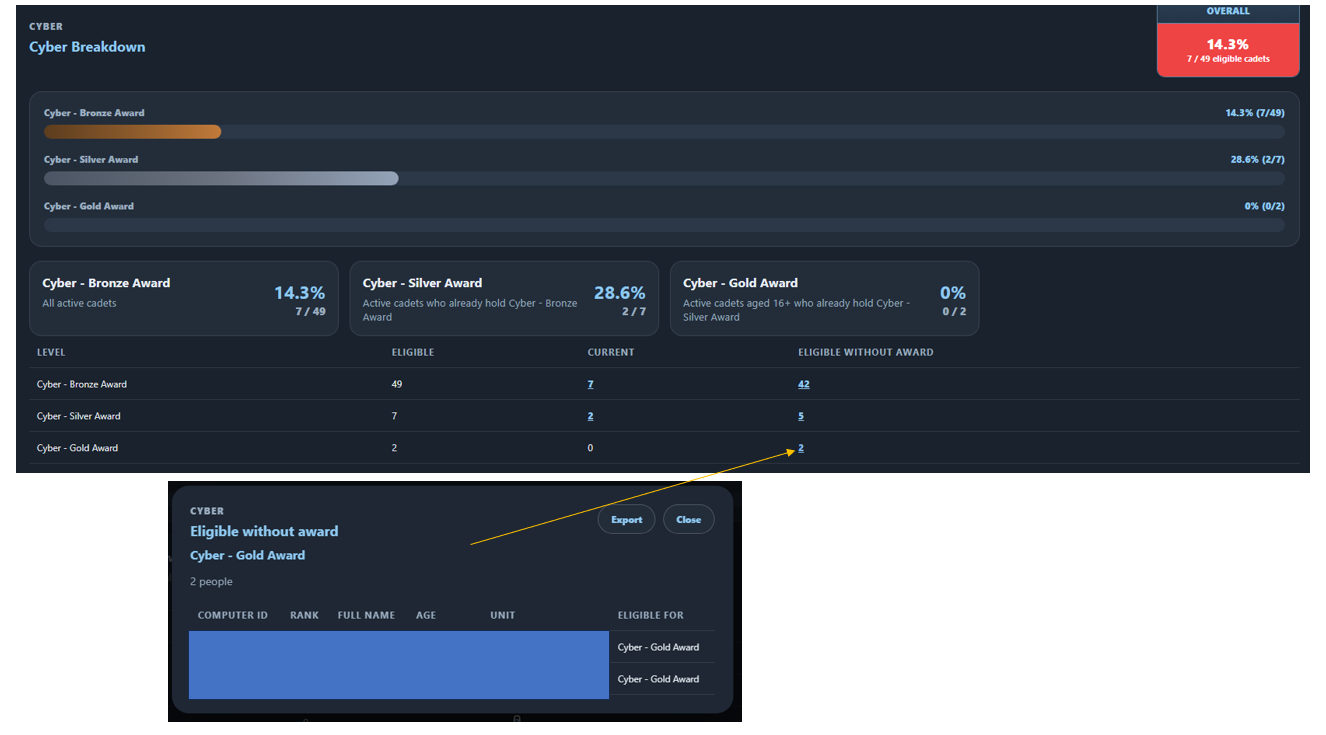
Yep, so on SQn we get “Silver Cyber course” we then wonder who is eligible! can simply find that now and target the cadets from a sqn, wing or more level. Much easier to help progress cadets who want to through PTS. I got one who is on going on Gold Cyber. i would not have found them unless looking at Dashy as who is elebigle.
In fact just looking I now have 2!!
It works as a chrome extension in the chrome browser. If the org modnet does not allow chrome extensions then no, I would use on a SQN computer. or continue as you do today.
I took a bunch of cadets for their basic swimming/CF test. I just pulled the nominal roll down, pasted in the CIN to the certificates and created a bunch of basic swimming certs for them. I batched added the qual and had to manually upload the certs to SMS but the cert creation was a printing was a doddle!
I showed the other staff this earlier tonight, and they were amazed at how well it works. OC said this will save him hours of clicking and writing things down. Click, click, print, and jobs a good’n.
Let’s pretend I know what you typed there haha, sorry I’m not that tech savvy unless I’ve been shown things at least once.
Serious question: why has nothing like this appeared sooner? It’s a game changer to asking cadets what exam they did last, which WHT they have done and when, or if they have done it, only to be stared at blankly and told ‘dunno’
I thought the ‘Training Tracker’ was decent when I first tried it, it still is decent and will be used. But up to now it’s 9.5/10 pour moi!
I am aware of another browser extension for a similar purpose. It obviously shows the lack of functionality in VP for holistic reporting - hopefully someone on the BADER team sees these chats and takes on board the time saving these generate and integrate some or all of the features in VP.
I’ve had a play with Dashy!, I reloaded the data 4 times and the activity area bar chart presented different quantities each time for the 4 squadrons I had selected.
I’ve had a few people email me to bring this thread to my attention. I won’t get in to specifics about the technology currently on the basis I haven’t yet seen it or explored what/how it works.
I would however address a couple of comments on the thread so far, vibe coding absolutely has its place, I do it a huge amount at work and can do so with the knowledge I have from my time leading the volunteer element of the digital team. The work that the digital team do is unfortunately subject to far greater controls in terms of testing, accreditation etc which certainly slows down the pace that the team can build at vs what they would like to build at.
I would also address comments regarding using volunteers with skillsets, this is exactly what the digital team does, with a hybrid team of people from across permanent staff and volunteers, they navigate building what people ask for vs capacity available and any limitations based on us through defence.
I’m always positively impressed by the wealth of tools that people create to overcome challenges and improve productivity. In the past month alone I’ve seen tools that create certificates, build admin orders, manage training programes etc. We all have a responsibility to ensure that we use and process data compliantly and so I always encourage people to reach out to the digital team where they have ideas and capability that can support development to ensure we continue to meet our data protection obligations and improve efficiency for volunteers and permanent staff.
I would encourage whoever is behind Dashy to engage with the digital team, Head of Digital is absolutely friendly forces when it comes to working with people to productively find solutions and ways forward, “no” is always a last resort.